

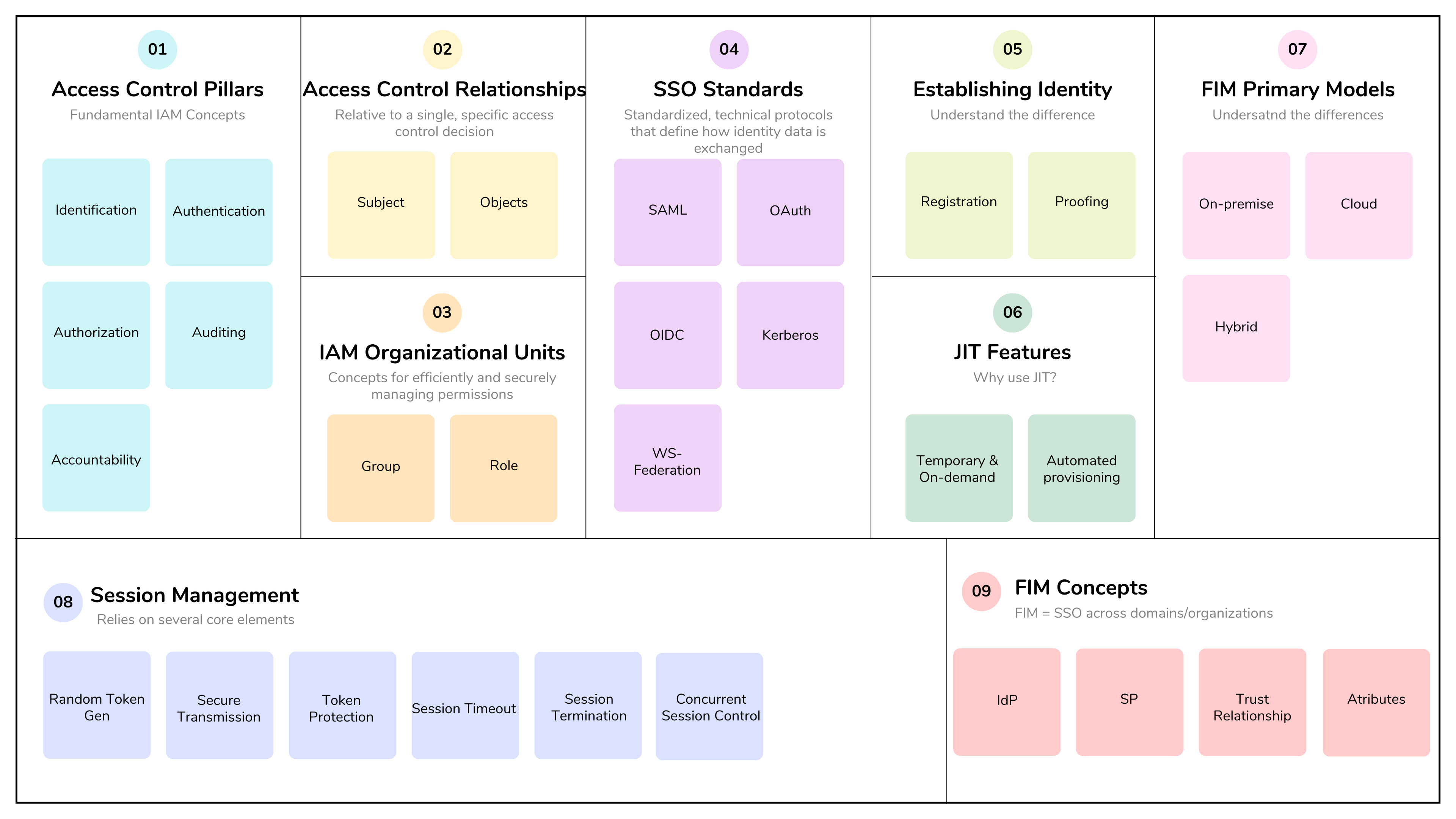
Domain 5 of the CISSP, Identity and Access Management (IAM), accounts for 13% of the exam. IAM is a practical application of the security principle of least privilege, and the associated concepts help organizations manage digital identities, control access to assets, and meet security requirements for confidentiality, integrity, and availability.
In Part 1, we will address objectives 5.1-5.3. Let’s dive into the domain and work through the material using the ISC2 exam outline.
5.1 - Control physical and logical access to assets
Identity and Access Management (IAM) is the concept and framework for security policies, processes, and technologies that ensure the right people and things (such as systems, devices, facilities, services, machines, or applications) have appropriate access to the right resources at the right time.
Access controls are “security mechanisms” that regulate who or what can view or use resources in an environment. They are categorized into two primary types based on the environment they protect: physical and logical.
Physical controls limit access to tangible assets, locations, and physical spaces within an organization. Examples include buildings, rooms, or specific IT assets like servers and hardware. The purpose of physical access controls is to prevent unauthorized entry, theft, vandalism, and other forms of damage.
Logical (or technical) access controls limit connections to computer networks, system files, and data. They enforce security constraints over digital environments and proprietary data using hardware and software mechanisms.
Access controls are really about relationships. In other words, what information can be transferred between a subject and an object:
Subject: the active entity accessing an object.
Object: the passive entity that has or provides information.
The terms “subject” and “object” are relative to a single, specific access control decision point. In the case of a user requesting a web page, initially, the user is the subject, and the web server is the object. When the server replies to the user, the relationship reverses.
A subject initiates a request.
An object is the target of the request.
In a chain of operations, an entity can be an object in one transaction and immediately become the subject in the very next transaction it initiates. This sequence of trust delegation is the basis for secure, multi-tier enterprise system operations.
A defense-in-depth strategy involves implementing physical and logical controls in layers. This layered approach is essential because no single security measure is foolproof. If one layer of defense is bypassed or fails, additional, independent layers are in place to detect and mitigate the threat, reducing the likelihood and impact of a successful breach.
Information
Information is any data that is collected, processed, or stored in any medium or form. As it relates to IAM, it’s important to recognize that information is a valuable asset that must be protected throughout its entire lifecycle, ensuring its confidentiality, integrity, and availability. The methods and access controls applied to protect valuable assets depend on their form and sensitivity.
Physical controls within IAM primarily focus on restricting access to the physical media and hardware where the information is stored, processed, or transmitted.
Logical controls are implemented through software and hardware configurations within the IAM framework to enforce information protection policies digitally, regardless of physical location.
Data classification and access control models, such as Discretionary Access Control (DAC), Mandatory Access Control (MAC), and Role-Based Access Control (RBAC), provide structured ways to define how access is granted or denied based on user identity. And, as we will discuss below, Identification, Authentication, Authorization, and Accounting play important roles in controlling, verifying, and auditing access.
Systems
Physical and logical access controls within an IAM framework are layered to protect various components of IT systems, from foundational infrastructure to applications and data services.
For data centers and server rooms, this can include biometric scanners, access badges/smart cards, an access control vestibule (AKA mantrap), and surveillance systems (CCTV).
Logical access controls manage access to the data, applications, operating systems, and network services themselves using software and configuration rules. Some authentication mechanisms include multi-factor authentication (MFA), privileged access management (PAM), and federated identity management (FIM).
Devices
Devices include any computing equipment, such as networking (e.g., routers and switches), storage (e.g., SAN, NAS), computers (servers, laptops, desktops, mobile devices), printers, and scanners.
Physical controls focus on securing the location and the hardware itself to prevent unauthorized removal, tampering, or direct console access. For instance, for networking equipment, locked server racks, monitored equipment rooms, and video surveillance are used. For computing equipment, device identification and registration with specific users, certificate-based device authentication, cable locks, and secure docks can be employed.
Facilities
Facilities include any physical location that an organization controls and uses to conduct business. Physical access controls link identity management to devices such as smart cards, mobile-based access keys, biometrics, and PIN pads. Logical access controls include identity governance and associated policies, as well as the management, configuration, authentication, and authorization of physical access control systems (PACS).
Applications
While software continues to “eat the world,” it’s important to restrict access to applications and the sensitive data they provide. Logical IAM-related access controls include assigning user-specific accounts and restricting access to sensitive data in accordance with the need-to-know/least-privilege principles.
Services
Services include various IT-related and internal and external-facing business functionality. Physical controls primarily apply to internal services and to the infrastructure that hosts external services. Logical controls are implemented within the software and network architecture of business services. They manage the digital identity and authorization process for both internal users (employees accessing internal systems) and external users (customers/partners accessing external services).
5.2 - Design identification and authentication strategy (e.g., people, devices, and services)
Groups and Roles
In Identity and Access Management (IAM), groups and roles are foundational concepts for efficiently and securely managing permissions. While often confused, they serve distinct purposes in organizing access rights and enforcing security policies.
A group is a logical container that holds multiple user identities (users). Instead of assigning permissions to each individual user, administrators assign a set of permissions to the group. Every member of that group automatically inherits all permissions associated with it.
Importance of Groups:
Scalability & Efficiency: Manages access for many users simultaneously.
Centralized Management: Simplifies administration, and access changes are made once at the group level rather than across hundreds of individual user accounts.
Simplifies Auditing: For instance, it’s easier to answer the question “who has access to the Finance drive?” by checking group membership rather than checking individual permissions on every file.
A role is a collection of permissions that define a specific job function or set of responsibilities within an organization (e.g., “Database Administrator,” “Help Desk Technician,” “Auditor,” “Customer Service Rep”). And of course, roles are the basis of a Role-Based Access Control (RBAC) model.
A key difference between groups and roles is that a role represents what a user is allowed to do within a system, independent of the individual user’s identity. Users are assigned a role, inheriting the defined permissions.
Importance of Roles:
Enforces Principle of Least Privilege: Roles should be designed with the minimum permissions needed for a specific job function, preventing users from gaining excessive access (principle of least privilege). When a user changes positions within the company, only the new role and its associated permissions should be granted, helping to avoid permission sprawl.
Policy Enforcement & Compliance: Roles map directly to business functions and policies, making it clear which permissions are necessary for a job and easily auditable against compliance requirements.
Separation of Duties: Roles can be structured to prevent conflicts of interest (e.g., the “Auditor” role cannot also have the “Finance Approver” role).
Platform Specificity: Roles are often specific to the platform they are applied to (e.g., an AWS IAM Role, an Azure AD Role, or a specific application role).
Authentication, Authorization and Accounting (AAA) (e.g., multi-factor authentication (MFA), password-less authentication)
The core functions of IAM are Authentication, Authorization, and Accounting (known as the AAA, or “Triple-A”), a model of access control. Identification and authentication allow authorization, which is audited (providing Accountability). Remember that identification and authentication occur together as a single, two-step process.
Identification, Authentication, Authorization, Auditing, and Accountability are five essential pillars of a comprehensive access control framework.
1. Identification. The process by which a user claims an identity to a system. It is the initial step in the security process, where the user presents a unique identifier.
How it works: A user provides a username, account number, or another unique identifier.
IAM Relevance: This identifier acts as the label to which all subsequent access rights, roles, and audit trails will be linked. Without a unique ID, the system cannot verify the user.
2. Authentication (AuthN): The process of verifying or binding the claimed identity to an actual person or entity. This is where the system confirms that the user is who they claim to be.
How it works: The user provides evidence or credentials to prove their identity. This evidence falls into three main categories:
Something you know (password, PIN).
Something you have (physical key, smart card, mobile phone for an MFA token).
Something you are (biometrics like a fingerprint, retina scan, or facial recognition).
IAM Relevance: Strong authentication mechanisms, especially MFA, are critical in IAM to prevent unauthorized access and identity theft.
3. Authorization (AuthZ): Authorization is the process of determining what specific actions a verified user is permitted to perform once they have successfully authenticated into the system.
How it works: The system checks the user’s assigned roles, group memberships, or specific permissions (defined by access control models like RBAC or ABAC) against the resource they are trying to access.
IAM Relevance: This is where the principle of “least privilege” is enforced. Authorization determines whether you can read a file, edit a record, or delete data, ensuring users have only the access required for their job function.
4. Auditing: The process of methodically reviewing system logs and records to verify that security policies have been followed and to detect any unauthorized activity or compliance violations.
How it works: The system logs every significant action (logins, file access attempts, configuration changes, permission modifications). Auditors review these logs to look for anomalies, such as access attempts at unusual hours or access to data the user typically does not use.
IAM Relevance: Auditing is crucial for compliance reporting (e.g., SOX, GDPR, HIPAA). It provides visibility into who accessed what data and when, allowing the detection of breaches or policy misconfigurations.
5. Accountability: The security principle that holds individuals responsible for their actions within a system. It ensures that every action can be uniquely traced back to a specific identity.
How it works: Because each user has a unique ID (Identification) and actions are logged (Auditing), there should be no shared accounts. If shared accounts are used, accountability is lost.
IAM Relevance: Accountability drives the need for strong IAM controls and logging practices. If an issue occurs, administrators must be able to definitively identify the individual responsible, which serves as a deterrent against misuse of access privileges.
Passwordless authentication is a modern security method that allows users to verify their identity and gain access to systems or services without entering a traditional password or any other knowledge-based secret. It replaces passwords with more secure and convenient alternatives, such as biometrics or physical security keys.
The core benefit of passwordless authentication is eliminating the primary target of many cyberattacks, such as phishing, credential stuffing, and brute-force attacks.
Most modern, secure passwordless methods rely on public-key cryptography (asymmetric encryption), often governed by the FIDO (Fast Identity Online) standards. The process involves two main stages: registration and login.
Registration/Enrollment
Key Pair Generation: When a user registers a device (like a smartphone or computer) with a service, the device generates a unique cryptographic key pair: a private key and a public key.
Public Key Storage: The service stores the public key (which, as we know, is safe to share). The private key remains securely stored on the user’s local device and never leaves it.
Local Verification Setup: The user sets up a local verification method (like a fingerprint, face scan, or device PIN) to unlock the private key on their device.
Login Process
Challenge Issued: When the user attempts to log in, the service sends a unique cryptographic “challenge” (a random string of data) to the user’s registered device.
Local Authentication: The user is prompted to verify their identity locally on their device using their pre-configured method (e.g., face ID, fingerprint scan).
Digital Signing: Upon successful local verification, the device uses the secure private key to digitally sign the server’s challenge.
Verification and Access: The device sends the signed response back to the server. The server uses the stored public key to verify the unique signature. If the signature matches, the service confirms the user’s identity and grants access.
Instead of a password, users can employ various factors:
Biometrics: Using unique physical traits like fingerprints, facial recognition, or iris scans built into devices (e.g., Apple Face ID, Windows Hello).
Hardware Security Keys: Physical USB or NFC devices (like a YubiKey) that store the private key in a tamper-resistant chip.
Magic Links/One-Time Passcodes (OTPs): A unique, single-use URL sent via email or an ephemeral code sent to a mobile authenticator app or SMS. The code or link acts as the temporary verification credential.
Push Notifications: A notification is sent to a trusted mobile app, and the user simply taps “Approve” (often secured by the phone’s local biometric check).
Some of the benefits of passwordless authentication include:
Increased Security: Eliminates weak, reused, or forgotten passwords. It renders common attacks such as credential stuffing, brute-force, and most phishing attempts ineffective because there is no static secret to steal.
Improved User Experience: Users no longer need to create complex passwords, remember them, or go through frustrating reset processes. Login is often faster and more seamless (e.g., a simple face scan or fingerprint tap).
Reduced Operational Costs: Organizations save money by decreasing the number of help desk calls for password resets, which often accounts for a significant IT support burden.
Implementing passwordless systems requires careful planning and addresses new technical and logistical hurdles, such as:
Implementation & Integration Complexity: Integrating FIDO2 or biometric systems with legacy applications and diverse IT infrastructures can be a significant technical hurdle and may require substantial development work.
Device Dependency: Authentication is often tied to a specific physical device (phone, laptop, security key). If the device is lost, stolen, or damaged, users must have robust backup/recovery options to regain access. In addition, if biometric data is compromised, it can’t be reset like a password.
Session management
Session management is an important security aspect of IAM that governs the lifecycle of a user’s interactive session after they have successfully authenticated. It ensures that the authenticated identity is maintained securely throughout the activity and properly invalidated when the session ends.
In simple terms, authentication confirms “who you are” at the start, and session management confirms “that it is still you” throughout the interaction.
When a user logs in (authenticates), the application or service establishes a session. This session is tracked by a unique, temporary identifier, for instance, a session token or session cookie, that the user’s browser or application holds and presents with every subsequent request. This prevents the user from having to re-enter their credentials for every action.
The goal of secure session management is to prevent attackers from hijacking or compromising this session token to impersonate the legitimate user.
Effective session management relies on several core elements that manage the token’s security and lifecycle:
Session ID/Token Generation: Tokens must be created using a strong, cryptographically secure random number generator. They must be unique, unpredictable, and sufficiently long to prevent attackers from guessing or brute-forcing them.
Secure Transmission (HTTPS/TLS): All session tokens must be transmitted only over encrypted connections (HTTPS/TLS). This prevents network eavesdroppers from capturing the token (session hijacking via sniffing).
Token Storage & Protection: The server must securely store the session data (e.g., in an encrypted database), and the client-side cookie must use security flags to prevent access by malicious JavaScript (XSS attacks).
Session Timeout: Inactivity timeouts automatically terminate a session after a defined period of user inactivity (e.g., 15 minutes). Absolute timeouts forcibly end the session after a set maximum duration (e.g., 8 hours), regardless of user activity.
Session Termination (Logout): This element ensures that when a user explicitly logs out, the session token is immediately invalidated on the server side, preventing an attacker from reusing a potentially captured token.
Session Renewal/Rotation: Periodically replacing the session token with a new one during a continuous session (e.g., after a period of time or upon a change in privilege like changing a password) limits the window of opportunity for an attacker to use a stolen token.
Concurrent Session Control: Limiting the number of simultaneous active sessions a single user identity can have prevents credential sharing and helps manage accountability.
Registration, proofing, and establishment of identity
In Identity and Access Management, identity proofing and identity registration are sequential, complementary processes that occur during the establishment of a digital identity, but they serve distinct purposes.
Identity Registration is the initial act of collecting identity data and creating an account in the system.
Identity Proofing is the rigorous process of verifying that the claimed identity belongs to a real person and that the provided information is authentic and not fraudulent.
Identity registration (also known as enrollment or identity provisioning) is the process of making a person’s claimed identity known to the IAM system.
The process includes the user (or an administrator on their behalf) entering basic information into a system, such as a name, email address, date of birth, username, and desired password. The goal is to establish a unique identifier and create a digital account profile within the system.
Identity proofing is the in-depth, often one-time, process of establishing a high degree of confidence that the “claimed identity” during registration matches the user’s “actual identity” in the real world. It is a form of due diligence that validates the authenticity of the identity.
The process may involve collecting and corroborating evidence from authoritative sources. Methods can be manual or automated:
Document Verification: Scanning and validating government-issued IDs (passports, driver’s licenses) and checking for authenticity and tampering.
Biometric Verification: Comparing a live selfie capture with the photo on the ID document to ensure the person presenting the ID is the rightful owner.
Database Cross-referencing: Checking provided personal information (SSN, address, etc.) against trusted databases like credit bureaus or government records.
In-Person Verification: A trained professional physically examines documents and confirms the applicant’s presence, often required for high-assurance identities.
Key differences in identity registration and identity proofing:
Purpose:
Identity registration: To collect basic information and create a system account.
Identity proofing: To verify the authenticity of the collected information and confirm the user’s real-world identity.
Timing
Identity registration: Happens first; the initial step of user onboarding.
Identity proofing: Occurs after registration information is collected, typically during the onboarding process or before access to sensitive data is granted.
Frequency
Identity registration: Typically a one-time process.
Identity proofing: A one-time intensive process, though components of verification may be used later for “step-up” authentication, to re-verify expired documents, or if risk levels change.
Federated Identity Management (FIM)
Federated Identity Management (FIM) allows users to access services across multiple, independent software systems or organizations using a single set of credentials. In simpler terms, it enables Single Sign-On (SSO) across different security domains or organizations.
FIM establishes a “trust relationship” between a service provider (the application the user wants to access) and an identity provider (the system that verifies the user’s identity).
Key Concepts and Components
Identity Provider (IdP): The authoritative source that owns and verifies the user’s digital identity (e.g., a corporate Active Directory, Azure AD, or Google account login).
Service Provider (SP): The application, website, or service that the user is trying to access (e.g., Salesforce, Workday, or a partner portal).
Trust Relationship: A pre-established agreement between the IdP and SP that defines the rules for how information will be exchanged and trusted.
Attributes: Pieces of information about the user (name, email, role, clearance level) that are shared securely during the federation process.
Common FIM Protocols
Federation relies on open industry standards to facilitate communication between disparate systems:
SAML (Security Assertion Markup Language): The most mature and widely used protocol for enterprise federation, typically used for browser-based SSO to SaaS applications.
OAuth 2.0 (Open Authorization): Primarily used for authorization (granting limited access to specific data) rather than full authentication (logging in). It’s commonly used when granting a third-party app access to your data (e.g., “Allow this app to access your Google Calendar”).
OpenID Connect (OIDC): A modern identity layer built on top of the OAuth 2.0 framework that handles full authentication. It is popular with customer-facing applications and mobile devices due to its simplicity.
Benefits of FIM
Improved User Experience: Users enjoy seamless SSO across different systems, reducing password fatigue and the need to remember multiple credentials.
Enhanced Security: It centralizes credential management with the trusted IdP, reducing the “attack surface” and making phishing attacks harder to execute.
Simplified Administration: Administrators only need to manage user identities in one central location.
B2B Integration: Facilitates secure interaction between business partners, suppliers, and customers without needing to provision accounts in each other’s networks.
Credential management systems (e.g., Password vault)
Credential Management Systems (CMS) provide a centralized, secure way to store, manage, and distribute digital credentials, such as passwords, access keys, certificates, and secrets.
While specific features vary between enterprise password managers and secrets management tools, common functionalities enable strong security, ease of use, and centralized control:
Encrypted Vaults: All credentials are stored within a strongly encrypted digital vault using robust algorithms (e.g., AES 256-bit). Data is often encrypted both at rest and in transit.
Secure Sharing: Allows administrators to share credentials with specific teams or individuals securely without revealing the underlying plain-text password to the recipient.
Strong Password Generation: Automatically generates complex, unique, and random passwords that meet organizational security policies.
Certificate Management: Provides the ability to issue, renew, and revoke digital certificates.
Privileged Access Management (PAM) Solutions: Systems focused on managing highly sensitive credentials used by IT administrators to access critical systems.
Examples of credential management applications include most web browsers, KeePass, and Bitwarden.
While highly beneficial, implementing and managing a CMS introduces specific security considerations that organizations must address to ensure the system does not become a single point of failure:
Centralized Risk: The CMS effectively becomes the central repository for all organizational secrets. If this primary system is compromised, an attacker could potentially gain access to the entire network. The CMS itself must be the most secure application in the organization, protected by a strong master password, multi-factor authentication (MFA), network segmentation, and constant monitoring.
Access Control and Least Privilege: Improperly configured permissions within the CMS can lead to insider threats. Implement strict Role-Based Access Control (RBAC) within the CMS. Access to credential vaults must align with job function, following the principle of least privilege.
Auditing and Logging: Many CMS systems generate logs about who accessed which credentials and when. Integrate CMS logs with a centralized Security Information and Event Management (SIEM) system and actively monitor them for anomalous activity.
Single sign-on (SSO)
Single Sign-On (SSO) allows a user to access multiple independent systems, applications, or services after logging in only once within a single domain, with a single set of credentials.
SSO improves both security and user experience by reducing “password fatigue,” minimizing help desk calls for password resets, and ensuring consistent application of strong authentication policies, such as MFA.
SSO functionality depends on standardized, secure technical protocols that define how identity data is exchanged between systems. The most common protocols are:
1. SAML
SAML is an XML-based standard that has been the backbone of enterprise and B2B federation for many years. It is widely used to connect corporate identity systems (like Active Directory) to third-party cloud applications (SaaS).
Primary Use Case: Enterprise SSO for browser-based applications.
Example: When you log into your company network and can automatically access a third-party SaaS application without logging in again, that typically uses SAML.
2. OAuth 2.0 (Open Authorization)
OAuth is an authorization framework that grants limited access to specific data rather than handling full user authentication. While it doesn’t handle SSO itself, it provides the plumbing for authorization.
Primary Use Case: Authorizing a third-party application to access specific data on your behalf (e.g., allowing a fitness app to read your Google Fit data without sharing your Google password).
3. OpenID Connect (OIDC)
OIDC is a modern identity layer built on top of the OAuth 2.0 framework. It uses simple JSON Web Tokens (JWTs) and handles the full authentication process, making it faster, lighter, and more developer-friendly than SAML.
Primary Use Case: Consumer-facing applications, mobile applications, and modern web services (e.g., “Login with Google” or “Login with Apple” often use OIDC).
4. Kerberos
Kerberos is a highly trusted network authentication protocol designed specifically for client/server environments within a private network (like a corporate LAN). It works seamlessly in the background, providing SSO for internal Windows environments.
Primary Use Case: Internal authentication within a Windows Domain environment.
5. WS-Federation
An older Microsoft protocol, WS-Federation, is primarily used to authenticate users to Microsoft services and applications within a federated environment, though it has largely been superseded by SAML and OIDC.
Note that Single Sign-On (SSO) and Federation are closely related concepts in Identity and Access Management (IAM), and the terms are sometimes used interchangeably. However, they describe slightly different scopes and implementations of seamless access:
SSO focuses on the user experience of seamless authentication within a single organization.
Federation is the underlying technical framework that builds a secure trust relationship between different organizations or security realms, which then enables a form of SSO across those boundaries.
Just-In-Time
Just-in-Time (JIT) access is a security approach in which users are granted permissions to systems or data only when explicitly needed to perform a specific task, and access is automatically revoked as soon as the task is completed or a set time limit expires.
Key features of JIT include:
Temporary Access: Permissions are not permanent. Access is time-bound (e.g., 30 minutes or 2 hours) and automatically expires.
On-Demand & Justified: Users must request access, often providing a business justification or tying the request to an IT ticket. This request is then approved, either manually or automatically, in accordance with predefined policies.
Automated Provisioning and De-provisioning: The system handles the granting and, crucially, the automatic revocation of access without manual intervention, minimizing human error and administrative overhead.
Principle of Least Privilege: JIT access ensures users receive only the minimum level of access required to complete their current task, rather than broad permissions based on their general job role.
Auditing and Monitoring: Every JIT session, request, approval, and action is thoroughly logged and monitored, creating a clear audit trail that is essential for compliance and forensic analysis.
5.3 - Federated identity with a third-party service
Federated Identity is a system of trust established between independent organizations or security domains, allowing users to authenticate with their “home” identity provider (IdP) and gain seamless, authorized access to resources and services provided by partner organizations (service providers) without needing separate credentials for each.
This “cross-domain SSO” relies on standardized protocols (SAML, OIDC) to securely exchange authentication “assertions” or tokens that verify the user’s identity. Remember that OIDC is an authentication layer built on top of the OAuth 2.0 protocol that provides a standard way for applications to verify user identity.
The key differences between on-premise, cloud, and hybrid scenarios lie in where the IdP is managed, where the services reside, and the complexity of integration and infrastructure ownership.
On-premise
In a purely on-premise scenario, all infrastructure is managed internally within the organization’s private data centers, and the organization has full control over the environment.
IdP: The IdP is typically an internal directory service (like Active Directory) hosted on private servers.
Service Providers: All applications and services are also hosted internally.
Federation Focus: The focus is usually on internal “single sign-on” using protocols like Kerberos or internal SAML 2.0 implementation between different internal systems. This is technically SSO, but the federation framework can be applied to link disparate internal systems. If a company wants to provide single sign-on for employees across multiple subsidiaries, WS-Federation can be used to establish a trust relationship between a central AD domain and each subsidiary’s domain.
Challenges: Requires capital investment, in-house expertise for maintenance, and limited scalability compared to cloud options.
Cloud
In a cloud-only scenario, identity management is delivered as a service via a third-party provider, and applications are hosted in the cloud.
IdP: The IdP is a cloud-based Identity as a Service (IDaaS) solution (e.g., Microsoft Entra ID, Okta, AWS IAM Identity Center). The cloud provider manages the infrastructure and scalability.
Service Providers: Applications are SaaS products or services running within a public cloud infrastructure (e.g., Facebook Open Graph, Salesforce, Zoom, AWS).
Federation Focus: The primary goal is seamless access to numerous third-party SaaS applications, using cloud IdPs/IDaaS, OIDC, or SAML, leveraging the flexibility and scalability of the cloud provider’s managed services. If, for instance, a SaaS provider wants to allow customers to authenticate using their existing Google accounts, they could integrate with Google’s OAuth 2.0 to enable federated authentication.
Challenges: Requires relinquishing some direct control over the infrastructure and relies on the third-party provider’s uptime and security.
Hybrid
A hybrid scenario combines elements of both on-premise and cloud environments, allowing organizations to maintain control over sensitive internal systems while leveraging the flexibility of the cloud.
IdP: The user’s primary identity typically originates on-premise (e.g., Active Directory) and is synchronized to a cloud directory. The cloud directory then acts as the central IdP for external services. Authentication can happen against either the on-premise or cloud system, depending on the configuration (e.g., password hash sync or direct federation).
Service Providers: Applications are a mix of internal legacy systems and external cloud applications.
Federation Focus: The main objective is creating a unified, seamless user experience and consistent security policy across both environments. This requires robust synchronization and the use of standard protocols to bridge the on-premise and cloud boundaries.
Challenges: This is the most complex scenario to manage, requiring careful integration, consistent policy enforcement across diverse systems, and robust monitoring to track user behavior across boundaries.
In part two, we’ll continue through Domain 5 and objectives 5.4 forward. If you’re on the CISSP learning journey, keep studying and connecting the dots, and let me know if you have any questions about this domain.
